
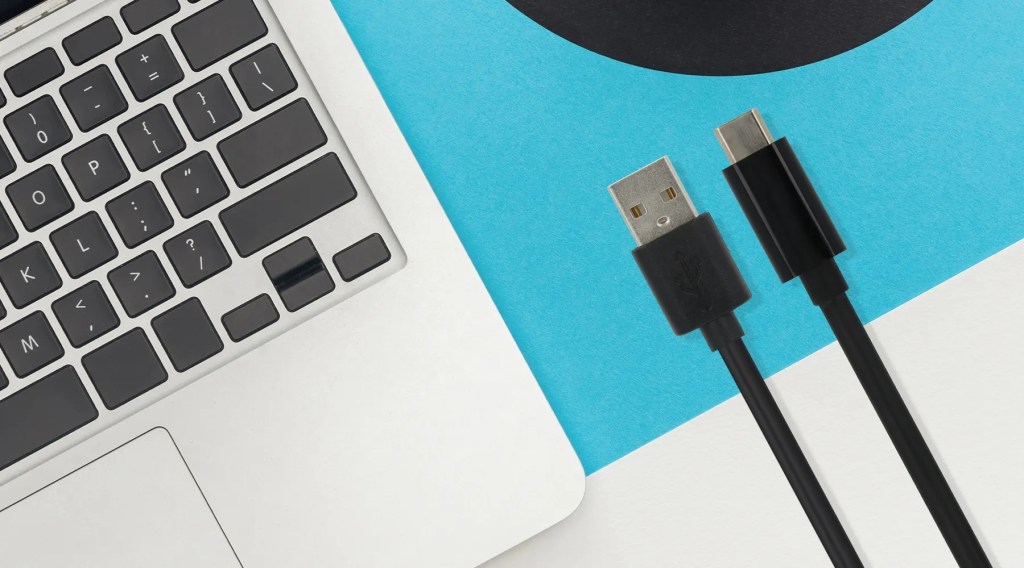
In today’s fast-paced digital world, the need for fast charging and reliable data transfer is more critical than ever. That’s where the USB-A vs. USB-C debate comes into play. While USB-A has been the standard for decades, USB-C is quickly becoming the new universal connector for modern devices. From smartphones and tablets to laptops and gaming consoles, understanding the USB-A vs. USB-C difference is essential for anyone looking to upgrade their tech setup in 2025.
This comprehensive guide breaks down everything you need to know about USB-A vs. USB-C, including design, speed, charging capabilities, compatibility, and real-world applications. Whether you’re a tech enthusiast, business owner, or just someone shopping for a new charger or cable, this article will help you make an informed decision. We’ll also highlight Utopia’s trusted OEM/ODM power bank services for businesses looking to provide cutting-edge portable power solutions with certified safety and performance.
What Is USB-A vs. USB-C? Core Differences Explained
To kick things off, let’s clarify the basics of USB A vs USB C.
USB-A, also known as USB Type-A, is the original USB connector introduced in the 1990s. It features a flat, rectangular shape and can only be inserted one way. This type of port is widely used in computers, older smartphones, TVs, and other peripherals like keyboards and mice.
USB-C, on the other hand, is the more recent iteration of USB technology. It’s smaller, symmetrical, and reversible—meaning it works no matter how you plug it in. USB-C supports a wide range of protocols, including Thunderbolt 3, DisplayPort, HDMI, and Power Delivery (PD).
The main USB-A vs. USB-C difference lies in speed, power capability, and versatility. USB-C is designed to be a universal standard that can do more with less clutter and confusion, making it ideal for modern gadgets.
USB-A vs. USB-C Design: Size, Shape, and User Experience
When it comes to physical design, the USB A vs USB C comparison is a no-brainer.
- USB-A: Bulky and one-directional, it can only be inserted in a specific orientation. This often leads to user frustration—how many times have you flipped a USB-A plug the wrong way?
- USB-C: Slim, sleek, and symmetrical. The reversible design improves the overall user experience, especially in low-light environments or when trying to plug in devices quickly.
Another USB-A vs. USB-C difference worth noting is the physical footprint. USB-C’s compact form allows manufacturers to design slimmer devices, such as ultrabooks, smartphones, and tablets. USB-A ports, due to their larger size, are often excluded from modern minimalist designs.
In short, USB-C wins on convenience, aesthetics, and compatibility with next-gen tech.
USB-A vs. USB-C Speed: Data Transfer Performance
One of the most significant advantages in the USB-A vs. USB-C speed debate is data transfer rate.
- USB-A: The most common versions are USB 2.0 (480 Mbps) and USB 3.0 (5 Gbps). Though capable, they are falling behind newer technologies.
- USB-C: Supports USB 3.1 (10 Gbps), USB 3.2 (20 Gbps), and even Thunderbolt 4 (up to 40 Gbps) depending on the cable and device configuration.
The improved speed makes USB-C the preferred option for transferring large files, such as 4K videos, high-resolution photos, and full system backups. In professional settings, such as video editing or gaming, the superior USB-A vs. USB-C speed becomes a major productivity booster.
USB-A vs. USB-C Charging: Power Delivery and Fast Charging
Let’s talk about power—literally. The USB-A vs. USB-C charging capabilities differ significantly.
- USB-A: Traditionally delivers 2.5W to 12W of power depending on the USB version. It’s fine for small devices but struggles with power-hungry gadgets.
- USB-C: Supports USB Power Delivery (PD) with up to 100W of output. This makes it capable of charging laptops, tablets, and fast-charging smartphones.
In addition to raw power, USB-C can intelligently negotiate power requirements between devices. This makes usb-a vs usb-c charging not just about speed, but also safety and efficiency. USB-C is clearly better suited for modern fast-charging needs.
USB-A vs. USB-C Compatibility: Bridging Old and New Devices
In terms of compatibility, the USB-A vs. USB-C difference becomes more nuanced.
- USB-A: Still dominant in many legacy systems and peripherals. Great for backward compatibility, especially in desktops and older hardware.
- USB-C: The future of USB. Found on almost all new Android smartphones, laptops, iPads, and accessories. However, it may require adapters when interfacing with older USB-A ports.
Adapters and hybrid cables (USB-A to USB-C) help bridge the gap, but they can reduce performance if the wrong versions are used. Still, USB-C offers more future-proofing, especially as more manufacturers phase out USB-A ports.
USB-A vs. USB-C Use Cases: When to Choose Each
So, when should you choose USB-A and when should you opt for USB-C?
- Choose USB-A if you’re dealing with older hardware or accessories. It’s still widely used in car chargers, desktop PCs, and budget-friendly devices.
- Choose USB-C if you want faster charging, quicker data transfers, or if you’re working with newer gadgets like MacBooks, Pixel devices, or Samsung Galaxy phones.
And when you’re equipping your business with charging solutions, versatility is key. That’s where Utopia’s OEM/ODM power bank services come in.
Utopia offers a comprehensive range of certified power bank products, including:
- Basic Power Bank
- Wireless Charger
- Mini Power Bank
- Built-in Cable Power Bank
- Built-in Plug Power Bank
Each product is available with USB-A and/or USB-C options, ensuring compatibility with all device types. Whether you’re a retailer, brand owner, or tech distributor, Utopia’s OEM/ODM service allows you to deliver high-quality, certified charging solutions tailored to your market needs.
FAQs about USB-A vs. USB-C
Can I use a USB A to USB C adapter?
Yes, you can. A USB-A to USB-C adapter allows older devices to connect with USB-C cables or peripherals. However, the speed and charging capabilities will be limited by the USB-A side. Always check the specifications before purchasing adapters for optimal performance.
Is the Apple charger USB A or C?
Apple now uses both. Older iPhones and iPads came with USB-A chargers, but newer models—especially since the iPhone 11 Pro—include USB-C to Lightning cables and USB-C adapters for faster charging. Apple is gradually moving towards full USB-C integration.
Is USB-A being phased out?
Yes, slowly. While USB-A is still found in many devices, manufacturers are shifting to USB-C due to its superior speed and power delivery. In a few years, USB-A might become obsolete in new consumer electronics.
Does USB-A to USB-C work both ways?
No, not truly. While the physical connection may be possible using adapters or dual-headed cables, the full-speed and power benefits of USB-C are only available when both ends of the connection are USB-C. USB-A ports cannot deliver or receive data at the same speed as USB-C.
Conclusion
As we wrap up the ultimate USB-A vs. USB-C guide for 2025, it’s clear that USB-C is leading the charge—literally and figuratively. From faster data transfers to high-powered charging, USB-C offers modern solutions for today’s tech demands. Yet, USB-A still has its place, especially in legacy systems and affordable accessories.
If you’re looking to stay ahead in the fast-evolving world of charging technology, partnering with a reliable OEM/ODM manufacturer is key. Utopia provides full-service custom solutions for portable chargers, offering everything from Basic Power Banks to Wireless Chargers and Built-in Plug Models, all with certified quality and tailored design support.
Make the smart move—future-proof your brand with Utopia’s OEM/ODM services today.

 UTOPIA | OEM/ODM Power Bank Manufacturer